A video of the tab. Plus every byte that flowed.
Behavior Reports capture a screen recording of the browser tab alongside the full network trace, console output, WebSocket frames and Server-Sent Events. Press play and watch the page misbehave while the timeline highlights every request that fired.
All features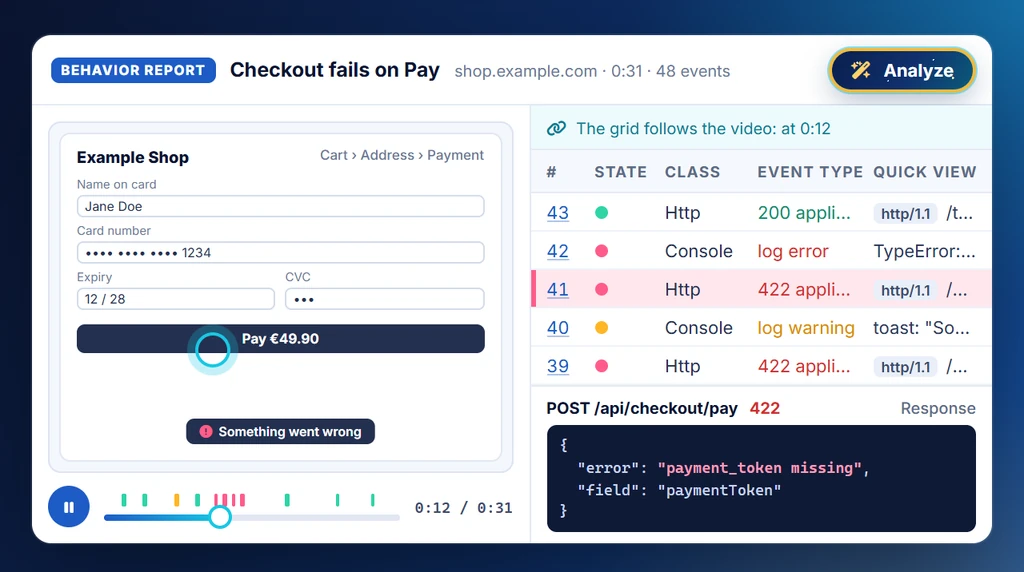
Replay-driven debugging.
A Behavior Report is the single most complete artefact webQsee produces. It pairs a WebM video of the browser tab with the entire event stream the analyzer would capture in real time. Scrub the timeline and the analyzer grid jumps to the same instant.
This is how you skip the "can you reproduce it?" loop. Record once, hand off the file, the next person presses play.
- Video of the tab synced to the event timeline
- Network, console, WebSockets and SSEs included
- The user journey: what you did on the page and how the page reacted
- Response bodies included, minus audio, video, fonts and binary streams
- Stored locally in IndexedDB until you choose to share
The user journey, beside the network
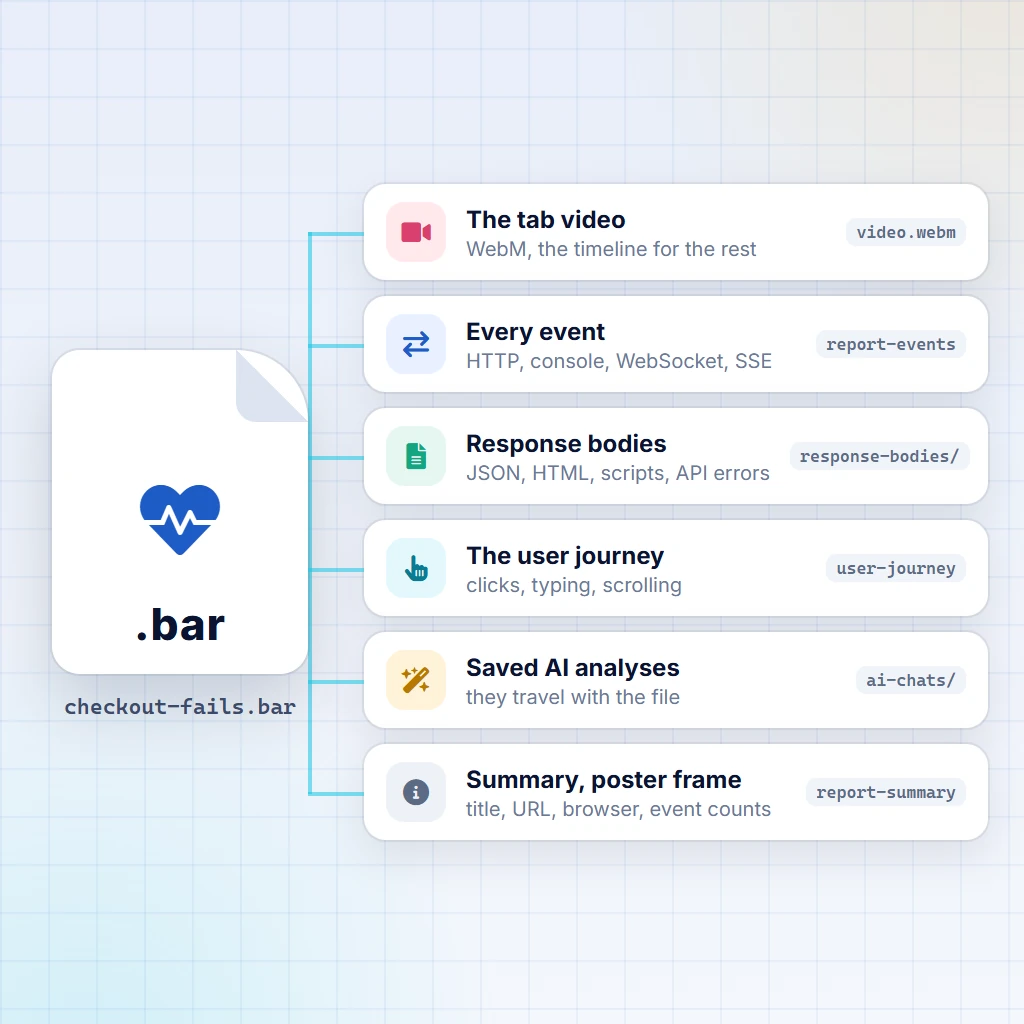
A Behavior Report also records what you did on the page and what the page did in return: clicks, typing, scrolling, focus and page changes, and the changes the page made to itself in reaction. By default the text typed into fields is recorded too, password fields included, because a bug often turns on exactly what was entered. In the recording options you can record key presses without the text instead, or switch the journey off.
The journey is read by the AI analysis, which masks typed text whenever credential masking is on, and it is not shown in the replay. The report itself keeps it as it was recorded, so a link to the report hands the typed text over too, and webQsee says so when you create one.
Response bodies, minus the dead weight
webQsee stores the response bodies that can explain a bug and skips the ones that never do: audio, video, fonts, and opaque application/octet-stream downloads are left out, as are redirects and empty responses. JSON, HTML, scripts and API errors are all kept, so the report stays useful without carrying a media library around.
Local-first storage
Behavior Reports land in your browser's IndexedDB. Nothing leaves the machine until you share or upload a report, or ask a cloud AI about it, and webQsee asks you to confirm the first time. Sensitive captures stay in the Local Gallery forever if you want them to.
Export as BAR
A Behavior ARchive (.bar) is a single file containing the video, the event stream and the captured response bodies. Hand it over a chat, attach it to an issue, drop it into the Local Gallery on another machine.
Cloud Gallery integration
Push reports into webQsee-provided storage or your own S3 bucket, then share a link that works for as long as you choose. Or skip the gallery entirely and mint a temporary link, which needs no account at all. Recipients open either one at view.webqsee.com, no extension required.
Free to record, export, import and replay.
Recording, exporting and importing Behavior Reports are all free. What your plan actually decides is how long a single recording may run, and how long a capture survives once you put it in the cloud.
| Action | No account | Free account | Pro | Studio / Enterprise |
|---|---|---|---|---|
| Record a Behavior Report | up to 20 sec | up to 1 min | up to 5 min | up to 15 min |
| Replay your own report | ||||
Export as .bar | ||||
Import someone else's .bar | up to 70 sec | any length | ||
| Temporary share link | 1 hour | 3 hours | 24 hours | 24 hours |
| Push to the Cloud Gallery | 7-day trial |
Need one long recording without changing plan? A Booster Pack includes five recordings of up to 15 minutes. Upgrading during a recording extends the limit live, the session keeps running.
Stop guessing. Start webQseeing.
Add webQsee to Chrome or Edge in one click. Recording and replay are free, no signup needed. Upgrade when you need AI analyses, cloud sharing, S3 storage and Pro-grade tooling.
Works in Chrome 103+, Edge 103+ and most Chromium-based browsers. Install instructions.