Two cloud modes. One direct browser-to-S3 architecture.
webQsee's Cloud Gallery either runs on a bucket we manage for you in one of six AWS regions, or on a bucket you bring yourself (Amazon S3 or any S3-compatible storage like min.io). Either way, captures move directly from your browser to S3; metadata is the only thing on webQsee's servers.
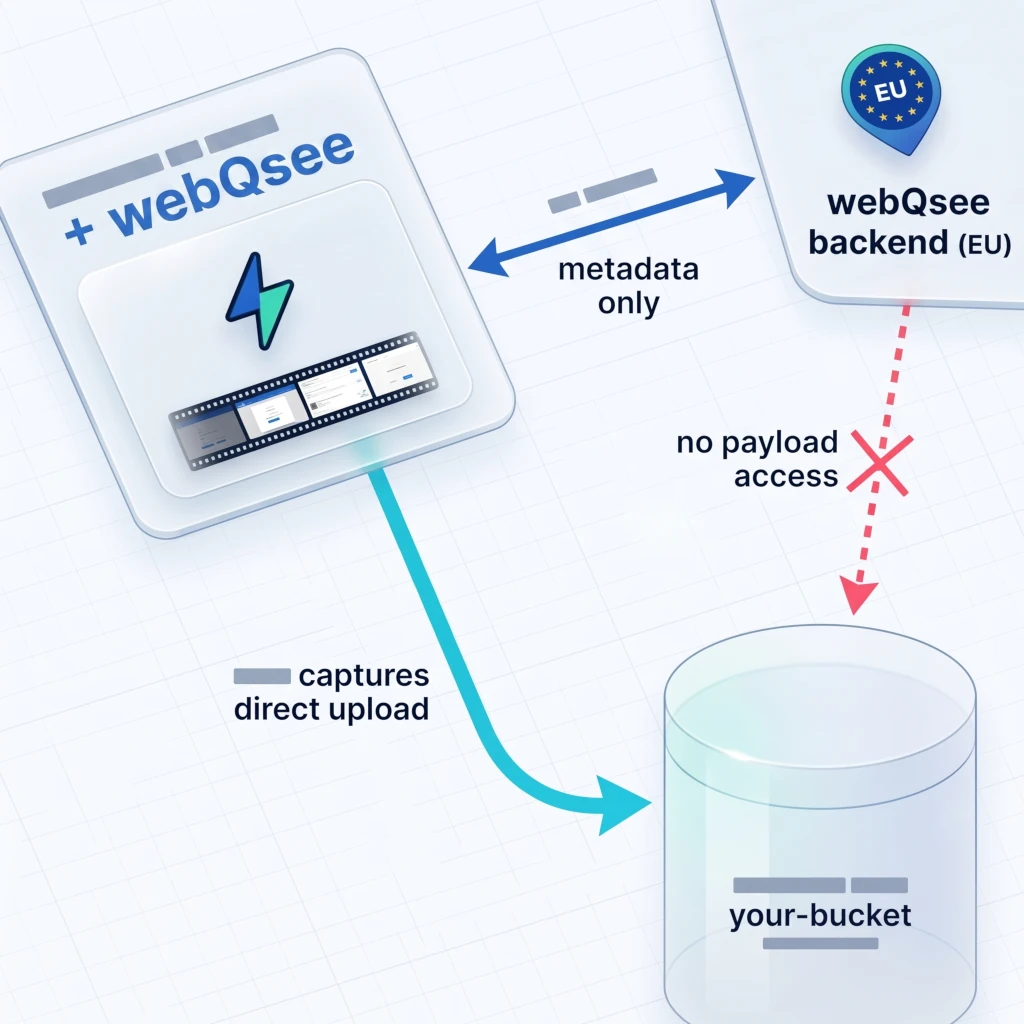
webQsee-provided vs Bring-your-own, at a glance.
| webQsee-provided | Bring your own (S3_KEY) | |
|---|---|---|
| Who pays the bucket bill | webQsee | You (your AWS / min.io) |
| Available on Free tier | 7-day trial, 5 items | — (paid only) |
| Item cap (Free / Pro / Studio) | 5 / 20 / 40 | – / no limit / no limit |
| Item lifetime (Free / Paid) | 7 days / 1 year (extendable) | Unlimited (you control) |
| Geographic region | You pick at provisioning (6 AWS regions) | Wherever your bucket lives |
| Tenant isolation | Path prefix in a shared bucket | Your own bucket (full isolation) |
| Setup time | ~30 seconds, in-extension | ~15-25 min (one-off, see tutorials) |
| Audit logs of object access | webQsee's S3 logs (not exposed) | Your CloudTrail / min.io audit log |
| Encryption at rest | SSE-S3 by webQsee | You configure (SSE-S3, SSE-KMS, BYOK) |
| Custom retention / lifecycle | Plan-driven (server-enforced) | Your S3 lifecycle rules |
One team, one storage. A team picks one of these modes at setup; you can't mix both for the same team. You can run multiple webQsee teams with different storage modes per team if you need.
Cloud storage on Amazon S3, managed by us.
webQsee operates dedicated Amazon S3 buckets in six AWS regions. When you provision provided storage, the extension picks one of those regions; webQsee handles the bucket, IAM policies, encryption and lifecycle. You upload exactly as you would with your own bucket, the browser still talks directly to S3 over HTTPS, with short-lived presigned URLs minted by webQsee's backend.
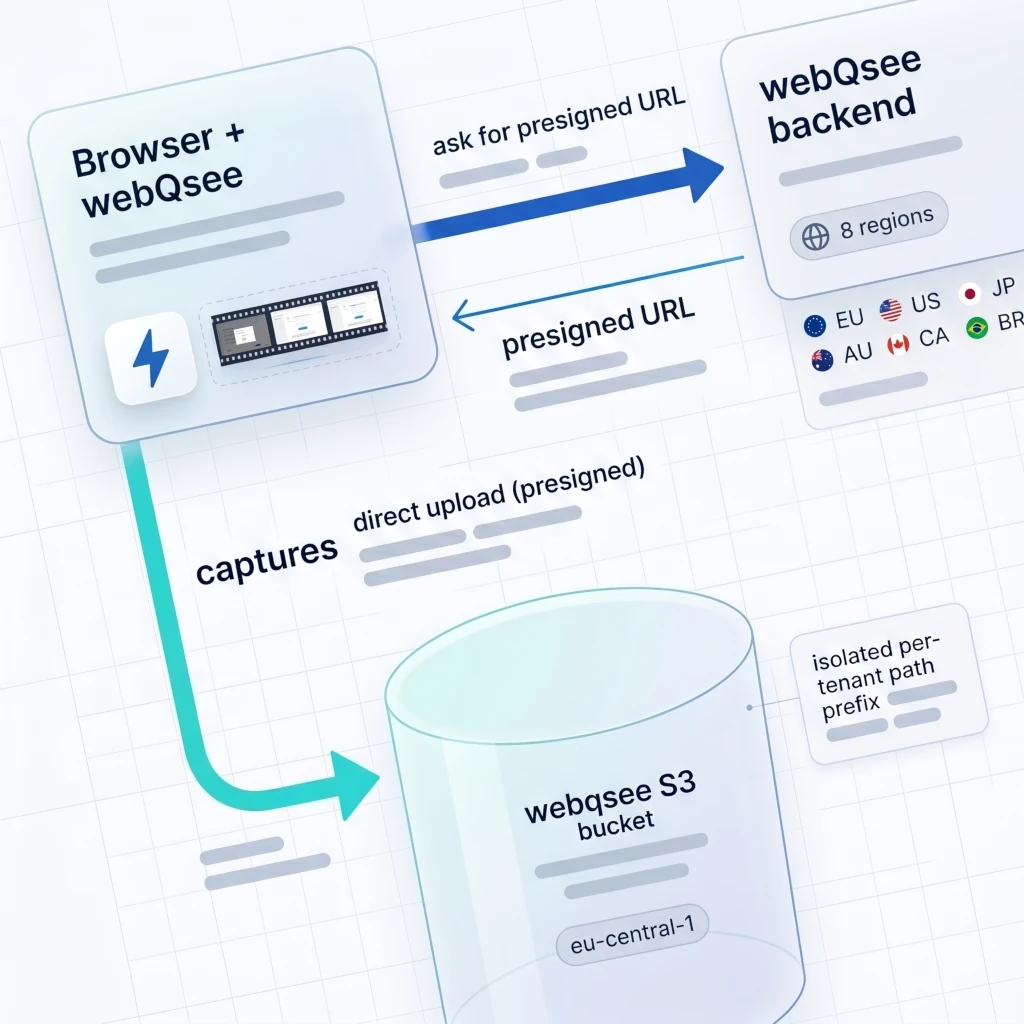
How it works (legend for the diagram above)
- The extension asks webQsee's backend for a presigned upload URL.
- The backend validates your plan, tenant path prefix, and item caps, then mints a short-lived presigned S3 URL.
- The extension PUTs the capture bytes directly to S3 using that presigned URL. The bytes never traverse webQsee's backend.
- Metadata (title, status, owner) is stored in webQsee's EU backend, exactly like with bring-your-own.
Available regions
Pick the region closest to your team. You can run multiple webQsee teams in different regions, but a single team's storage lives in one region only.
| Region | AWS code | Best for |
|---|---|---|
| 🇪🇺 Europe (Frankfurt) | eu-central-1 | EU customers, GDPR-conscious teams |
| 🇺🇸 USA (Ohio) | us-east-2 | North-American teams |
| 🇨🇦 Canada (Central) | ca-central-1 | Canadian residency requirements |
| 🇯🇵 Japan (Tokyo) | ap-northeast-1 | APAC, low-latency to Japan |
| 🇦🇺 Australia (Sydney) | ap-southeast-2 | Australia / NZ teams |
| 🇧🇷 South America (São Paulo) | sa-east-1 | LATAM teams |
eu-central-1. Teams that need provider-level full isolation should choose Bring-your-own.Plan limits for provided storage
| Plan | Max items | Item lifetime | Temporary share link |
|---|---|---|---|
| No account | — | — | 1 hour |
| Free Account | 5 (7-day trial) | 7 days, auto-deleted | 3 hours |
| Pro | 20 | 1 year, extendable | 24 hours |
| Studio / Enterprise | 40 / custom | 1 year, extendable | 24 hours |
Item lifetimes are server-enforced. Free-account items are auto-deleted at the 7-day mark. Paid items can be extended past 1 year using a Longer Storage Booster. Item cap can be temporarily raised with a +5 cloud items booster.
What we can and can't see
In provided storage, webQsee operates the bucket so we technically have access to the S3 objects. We never read them in normal operation, but legally and architecturally we could. If that's a concern for your threat model, use Bring-your-own, where webQsee has zero technical capability to read your captures.
Cloud storage on your bucket, your AWS bill, your full control.
Bring-your-own (mode S3_KEY in the extension) is the strongest privacy setup: webQsee never gets credentials to your bucket. The extension uses your Access Key ID + Secret to PUT and GET objects directly. webQsee's backend stores metadata only (item title, description, status, team membership), and physically can't access the payload because we don't hold the keys.
What it works with
- Amazon S3, any AWS region you choose
- Self-hosted min.io, served over HTTPS with a publicly-trusted certificate
- Other S3-compatible storage that supports SigV4 + path-style addressing
Plan limits
Bring-your-own is exclusive to paying customers. There are no webQsee-imposed item caps and no webQsee-imposed lifetimes; the bucket is yours.
| Plan | BYO available | Item cap | Item lifetime |
|---|---|---|---|
| Free Account | — | — | — |
| Pro | No webQsee limit | You control (S3 lifecycle) | |
| Studio / Enterprise | No webQsee limit | You control |
Setup paths
Amazon S3, simplified
One shared IAM user for the whole team. Easiest path; ideal for solo developers and small trusted teams.
15-min tutorialAmazon S3, multi-user / RBAC
One IAM user per team member, tag-based folder isolation, per-user audit trail.
25-min tutorialSelf-hosted min.io
The same S3 protocol on hardware you control. Same bucket policy, plus two min.io-specific connection-settings keys.
25-min tutorialMigrate / multi-team topologies
Switch from simplified to multi-user, share one bucket across teams, or split into per-team buckets.
All S3 tutorialsSecurity model
In BYO mode, webQsee never holds your bucket credentials. Each team member's Access Key + Secret are stored locally in their browser, encrypted in extension storage. webQsee's backend can't read them; you re-enter them on every device.
- In transit: TLS 1.2+ on every S3 call; HTTPS enforced for min.io.
- At rest: you pick SSE-S3, SSE-KMS or BYOK on the bucket.
- Public access: tick "Block all public access" on the bucket; sharing uses presigned URLs created on demand by the extension.
- IAM: use the published
webqsee-bucket-rwpolicy template (scoped to one bucket, nos3:*on everything else).
What ends up where, in both modes.
| Data | S3 bucket | webQsee backend (EU) | Local IndexedDB |
|---|---|---|---|
| Behavior Report video (.webm) | — | cache until upload | |
| Behavior Report network/console (.bar) | — | cache until upload | |
| Event Snapshot (.esa) | — | cache until upload | |
| Full-page screenshot (PNG) | — | cache until upload | |
| Thumbnails | — | cache | |
| Item title, description, tags, status | — | cache | |
| Team membership & ACLs | — | cache | |
| Sharing link tokens | — | — | |
| Your AWS Secret (BYO only) | — | — | |
| webQsee's AWS Secret (provided only) | — | (server-only) | — |
Recipients open shared captures at view.webqsee.com.
Both modes work transparently with the web client at view.webqsee.com. A shared cloud item carries a short token; the recipient signs into view.webqsee.com (or has it open already), the page fetches the metadata from webQsee, then pulls the capture bytes directly from S3 via a presigned URL (provided mode) or the user's own credentials (BYO).
Recipients never install anything for view-only access. Editors still need the extension.
When something doesn't connect.
Bring-your-own
- CORS error on PUT. Re-check the CORS configuration on the bucket. Methods must include
PUT POST GET DELETE HEAD, exposeETag, allow your extension origin. - 403 Forbidden on PUT. IAM policy ARN doesn't match the bucket name, or the principal tag
webqsee-user-idisn't set on the IAM user. - SignatureDoesNotMatch. Region mismatch between team-wide settings JSON and the bucket's actual region; or v2 instead of v4 signing on min.io.
- net::ERR_CERT_AUTHORITY_INVALID (min.io). The cert must be trusted by every team member's browser; self-signed won't work cross-origin.
- "This bucket must be addressed using the specified endpoint" (min.io).
s3ForcePathStyle: trueis missing from the connection settings.
webQsee-provided
- "Trial expired" on a free account. Items in provided storage older than 7 days are server-deleted automatically. Upgrade to Pro to keep them.
- "Item cap reached". Free 5 / Pro 20 / Studio 40. Either delete some items, upgrade tier, or buy a +5 cloud items booster.
- Long upload times. Pick a region closer to your team. Provisioning into the wrong region can only be fixed by switching the storage type (one team, one storage).
- "Cannot create temporary storage". The self-hosted min.io provisioning tier was retired; create a new provided storage in a non-temporary region instead.
Stop guessing. Start webQseeing.
Add webQsee to Chrome or Edge in one click. Recording and replay are free, no signup needed. Upgrade when you need AI analyses, cloud sharing, S3 storage and Pro-grade tooling.
Works in Chrome 103+, Edge 103+ and most Chromium-based browsers. Install instructions.