Bring the coding agent you already pay for.
Deep Inspection hands a whole recording to an AI coding agent on your machine: Claude Code, Codex CLI, Antigravity CLI, Cursor, Cline or opencode. The agent reads the traffic, pulls video frames, searches response bodies and, with a project folder mapped, finds the code behind the problem. webQsee is not in the middle: your agent, your account, your machine. Below is the comparison matrix we maintain by measuring the installed CLIs, not by quoting their marketing pages.
How the AI analysis works/assets/img/agent-logos.pngAvailable now in the browser, and in the extension this autumn.
The AI analysis, the three webQsee AI strengths, Deep Inspection and the new plans are live today in webQsee web at view.webqsee.com: open a recording there, analyse it, and buy a plan or a booster if you want one. The Chrome and Edge extensions are in review and follow this autumn. Your recordings, your gallery and your account are the same in both, so nothing you do now has to be done again.
Six agents, measured.
Every cell below was read from the installed binaries and their own --help, last measured on 2026-09-03 with claude 2.1.258, codex 0.152.1, cursor agent 2026.08.31, cline 3.0.61 and opencode 1.18.26, and on 2026-09-09 with agy 1.1.28, when all six were also run end to end for the first time. CLIs move fast; if a cell has drifted, tell us.
| Capability | Claude Code | Codex CLI | Antigravity CLI | Cursor | Cline | opencode |
|---|---|---|---|---|---|---|
| Headless run (browser chat) | -p | exec | -p | --print | --json | run |
| Machine-readable event stream | stream-json | JSONL | stream-json, own envelope | stream-json, Claude-shaped | --json | --format json |
| Per-run MCP isolation | --strict-mcp-config | --ignore-user-config | none offered4 | none offered4 | isolated data dir1 | inline config env var |
| Resume a conversation | --resume | exec resume, fork | --conversation, --continue | --resume, persist | --id | -s, --fork |
| Extra project roots | --add-dir | --add-dir | --add-dir | --add-dir | none found | none found |
| Permission model | tool allowlist | sandbox levels | --mode plan / accept-edits | plan/ask modes + sandbox | plan mode2 | named agents |
| Cost or run ceiling | --max-budget-usd3 | webQsee's run timer | webQsee's run timer | webQsee's run timer | --timeout | reports real cost per step |
| Structured sign-in probe | auth status, JSON | doctor --json | models exit code | reported as unknown | reported as unknown | providers list |
1 Cline reads MCP servers only from its data directory, so webQsee gives each run its own and copies the credentials in; the settings-path environment variable it documents is not read by the CLI, and a run wired that way starts with no webQsee tools at all. 2 Cline is the one CLI whose auto-approve defaults to on. In a terminal webQsee pins it off, because a human is there to answer. Headless it must not: with no terminal the approval can never arrive, every tool is refused, and the run ends having done nothing. Plan mode is the read boundary instead. 3 Claude's dollar ceiling caps API-billed spend only, so on a Claude subscription it has no effect; webQsee adds its own wall-clock ceiling that works on every agent and every plan. 4 Antigravity and Cursor register MCP servers globally and offer no per-run config file: Antigravity has no allowlist at all, and Cursor merges its global file with the project one, so neither can be limited to a single server. On those two, analysis runs also see your other MCP servers, and webQsee does not write those global configs for you. Antigravity additionally auto-denies any tool that would need a permission prompt when run headlessly, so it needs allow-rules under permissions.allow in ~/.gemini/antigravity-cli/settings.json before it can read anything.
How webQsee talks to your agent.
The integration decisions that matter are the invisible ones. These are ours, and why.
One MCP server, every agent
The webQsee helper serves your recordings over the Model Context Protocol on 127.0.0.1. Whichever agent runs, it gets the same tools: list the events, read one request with its body, search across bodies, pull video frames, compare several recordings. The agent decides what to read; nothing is pre-truncated for it.
Your other MCP servers stay out of it
An analysis run must not inherit whatever MCP servers you configured for daily work, so every launch that can isolates its configuration in the vendor's own dialect: Claude's strict mode, Codex's ignore-user-config, Cline's own data directory, opencode's inline config. Four spellings, one rule. Antigravity and Cursor are the exceptions and we would rather say so than imply otherwise: both register MCP servers globally with no per-run override, so on those two your other servers are in the room. Nothing writes those global configs behind your back either.
The prompt never meets a shell
A prompt is a page of text with quotes, braces and newlines in it, and every shell layer between webQsee and the agent has its own opinion about those. So the prompt travels out of band: written to a file the terminal reads, piped over stdin where the CLI supports it, and never through cmd.exe, whose parser silently truncates at the first newline. The failure this prevents does not error; it answers with half the question missing.
Write access is earned twice
By default an agent reads. It may only change code when a project folder is mapped AND you ticked "may change code" for that run, and the escalation is expressed in the vendor's own permission language: read-only sandboxes, plan modes, tool allowlists. No webQsee profile ever ships a skip-permissions or auto-approve flag, whatever the vendor calls it that month.
Both directions, not just push
The browser can start an agent, and an agent already sitting in your project can pull: register the helper once as an MCP server and your editor's agent lists your recordings, fetches one, or waits with await_new_recording while you reproduce the bug in the browser. That direction has no per-call metering, by design.
Terminal runs you can still talk to
A mirrored terminal run shows its progress in the browser, and questions typed in the browser are queued for the agent, which collects them between steps over MCP. The UI says "queued", not "sent", because delivery is the agent's choice; honesty about that difference is the feature.
Every agent you have, in one list.
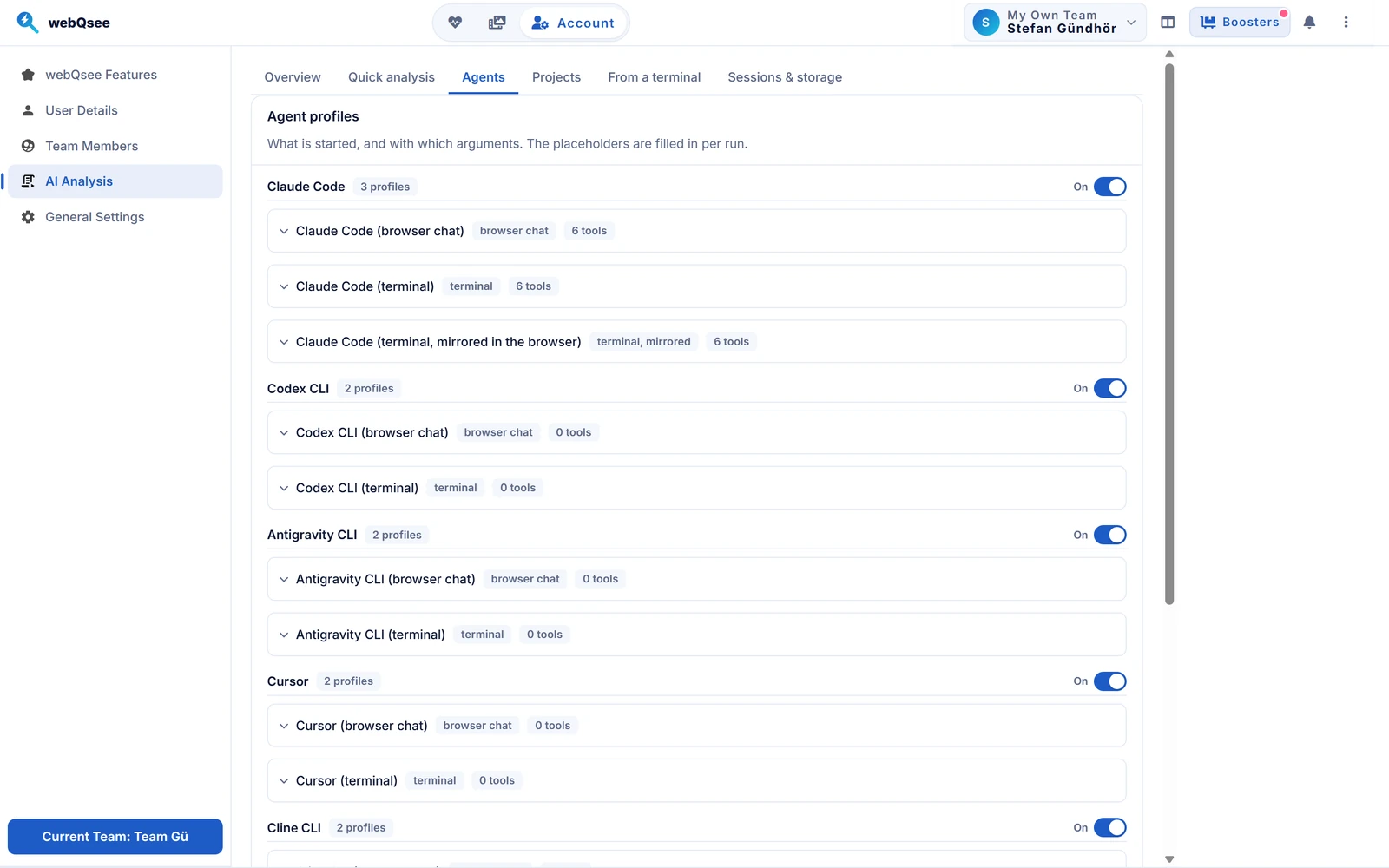
webQsee finds the CLIs already installed on your machine and groups them by vendor, each with its profiles: run it in the browser, or in a terminal you type in. An agent you do not want offered is switched off here, and then it is not probed either, so it costs neither a process nor a wait.
Register the helper with your agent, once.
Download the helper Step-by-step install guide
The extension's settings write these lines for you, token included. For reference, the shape per client:
| Claude Code | claude mcp add --transport http wqs <url> --header "Authorization: Bearer <token>" |
|---|---|
| Codex CLI | codex mcp add wqs --url <url> --bearer-token-env-var WQS_MCP_TOKEN |
| Antigravity CLI | agy mcp add -H "Authorization: Bearer <token>" wqs <url> |
| Cline | cline mcp add wqs <url> --transport streamableHttp --header "Authorization: Bearer <token>" --yes |
| Cursor | an mcp.json entry; the settings hand you the ready fragment |
| opencode, others | any MCP client takes the raw URL plus the bearer header |
The URL is 127.0.0.1 only and the token never leaves your machine; the helper refuses remote connections by design.
The fine print, out loud.
Does webQsee charge per analysis or resell model tokens?
No. With your own agent, the model bill is between you and your vendor; webQsee counts analyses against your plan's monthly allowance and is otherwise not in the loop. The optional webQsee AI quick analysis is the one variant where webQsee pays the model.
Which agent should I pick?
The one you already pay for. The profiles differ in plumbing, not in what the agent may read: every vendor gets the same recording over the same tools. Claude Code is the longest-verified path; the newer profiles say so in the settings until their first run on your machine has confirmed them.
Can the agent see my source code?
Only when you map a project folder or point a single run at one, and the saved analysis says a project was in scope, so a later reader of a shared link is warned that quoted code may not come from the recording. Without a folder the agent sees the recording and nothing else.
What about a recording that spans two of my apps?
Give the run more than one folder: the first is the working directory, the rest ride along with the vendor's own flag, and each folder can carry a one-line description in your words so the agent knows which is which.