One question, one link, and the bug is somebody else's problem.
Sharing in webQsee is a single decision: keep the capture in your team's Cloud Gallery, or mint a temporary link that needs no account at all. Either way the recipient opens it at view.webqsee.com and inspects it in a browser tab, no extension, no signup.
All features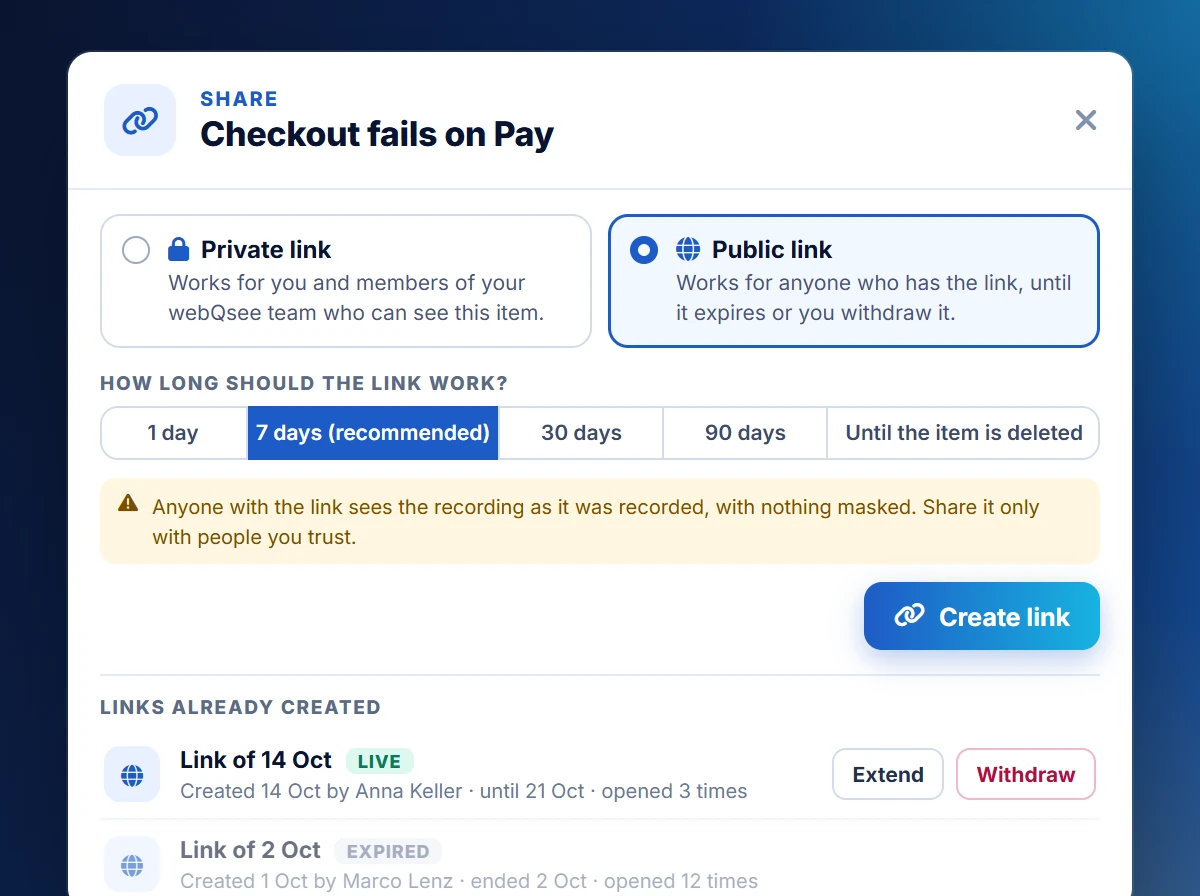
Pick by who should be able to open it.
webQsee asks one question when you share, and the answer determines both where the capture is stored and who can reach it.
Temporary public link
No account needed, on either end. The capture goes to short-lived webQsee storage and the link expires by itself: 1 hour without an account, 3 hours on a free account, 24 hours on any paid plan or with a Booster Pack.
Does not consume your cloud item quota. Best for one-off handoffs to someone outside the team.
Public link
The capture lives in your Cloud Gallery and anyone holding the link can open it. You choose how long it works, 1, 7, 30 or 90 days or until the item is deleted, and you can extend or withdraw it at any time.
Requires an account and webQsee-provided storage. Not available when your team runs on a bring-your-own S3 bucket, because the bucket is not reachable for people outside your team.
Private link
The item's own address: it works for as long as the item does, and only you and the members of your webQsee team who can see the item can open it. This is the default for internal work and the only link type that works with a bring-your-own bucket.
Requires an account. Team-wide visibility needs a Studio or Enterprise plan.
| Action | Local Gallery | Cloud Gallery |
|---|---|---|
Export as .bar / .esa / .har file | ||
| Temporary public link | ||
| Upload into the Cloud Gallery | already there | |
| Public link | ||
| Private (team) link | ||
| Copy links for several items at once |
Every item type is shareable
Behavior Reports, Event Snapshots, videos, screenshots and imported files all open in a viewer for the recipient, inside and outside your team, in the extension and at view.webqsee.com alike.
A URL that travels with metadata.
Every Cloud Gallery capture has a shareable link, and webQsee copies it together with the capture's metadata: title, description and notes, when it was captured and on which browser, and until when the link works. Paste it into an email, an issue tracker, a chat: the recipient lands on a fully-contextualized analyzer view.
Since webQsee 9.3 a public link expires after the time you chose, 7 days unless you pick another, and you or your team's admins can withdraw it at any time; the item's list of links says how often each one was opened. No link outlives its item, which ages out on your plan's schedule (7 days on the free trial, 1 year on paid plans, extendable).
What a link carries
- Capture title, description and notes
- When it was captured, how long it runs, how many events, which browser
- Until when the link works and how long the item is kept
- Access permission scope (team-only, link-only)
- Opens at view.webqsee.com
A link and a file beat a plugin.
webQsee used to ship direct integrations with Jira, Slack and Microsoft Teams, each with its own credentials, webhooks and setup screens. They were retired in webQsee 8. A copied link works in every one of those tools with no configuration, survives permission changes on their side, and never breaks when an API version is deprecated.
So the workflow is: share, paste. The clipboard carries the link together with the capture's title, description, notes and until when the link works, formatted so it renders sensibly wherever you drop it.
Paste it into
- A Jira, Linear, Azure DevOps or GitHub issue
- A Slack or Microsoft Teams channel
- An email to a customer or an auditor
- A pull-request comment or a wiki page
- Anywhere else a URL is allowed to travel
Prefer a file? Export the capture as .bar, .esa or .har and attach it instead.
Who can share, who can receive.
Temporary links require nothing at all. No account, no plan, no card. Install the extension, capture, share, and the link works for an hour. A free account stretches that to three hours, a paid plan or a Booster Pack to a full day.
Public and private links need an account and, once the free tier's 7-day cloud trial is over, a paid plan, because the capture has to keep living in the Cloud Gallery for the link to keep resolving. Members invited into a paying team inherit that for the duration of the invitation.
Receiving requires nothing, ever. Anyone with a browser can open a webQsee shared link at view.webqsee.com and inspect the capture, no installation, no signup, no friction.
Asymmetric by design
webQsee is built so the team in the trenches pays for the tooling, and the wider organisation, clients, managers, support, can review captures without overhead. That's how a bug report actually moves.
Stop guessing. Start webQseeing.
Add webQsee to Chrome or Edge in one click. Recording and replay are free, no signup needed. Upgrade when you need AI analyses, cloud sharing, S3 storage and Pro-grade tooling.
Works in Chrome 103+, Edge 103+ and most Chromium-based browsers. Install instructions.